Typed architecture claims
Shape
Architecture claims as text files, reviewed by people, checked by shp in CI.
The problem
Section titled “The problem”Architecture decisions often live only in people’s heads, chat threads, or outdated diagrams. Code review then depends on someone noticing that a pull request hard-deletes a document’s revision history, exposes private drafts on the public feed, or breaks a dependency rule the team already agreed.
Tests check behaviour and typecheckers check types. Neither is a natural place to state a durable decision such as “revisions are append-only” or “only the publisher may serve the story endpoint”, and to keep that decision visible and enforced as the code changes.
What Shape is
Section titled “What Shape is”Shape is a small language for writing those decisions down as claims, and shp is the checker that accepts or rejects them. A claim is a declaration the author asserts, such as “Revision is append-only” or “RevisionLog.appendRevision appends revisions and does nothing else”.
Claims live in .shape files under shape/. Together the files form the Shape model: the checker loads every .shape file it finds there and checks them as one model. People, and optionally coding agents, write the claims. Reviewers read them in the pull request like any other change.
The boundary
Section titled “The boundary”Shape judges only the declared Shape model. shp check reads .shape files and, when given, a changed-file list. It never opens or runs the application source that source and evidence refs name. It does not prove that the implementation matches the claims, and it does not replace tests, typechecks, or code review.
A passing check means the claims are coherent with each other. When CI also supplies a changed-file list, a pass also covers the change-set checks described under Where Shape sits in review. Whether the claims describe the code truthfully is decided in review.
Parts of a model
Section titled “Parts of a model”| Part | Keywords | What it claims | Read more |
|---|---|---|---|
| Resources and traits | resource, trait | The data that matters, and the effects that are finally forbidden on it | Effect Model |
| Components | component, owns, grants | Which component owns a resource, and which effects its functions may have | Effect Model |
| Function summaries | fn, effects complete, effects unknown, source, evidence | What each source function does to resources, with references to the code | Effect Model |
| Relations and rules | relation, rule | How components and resources connect, and which providers, paths, or cycles are forbidden | Relations and Graph Rules |
| Change governance | implementation, binding, attest | Which source paths need a model update when they change, and which files must change together | Keep the Model Current |
| Design memory | rationale, memory, guards, change, reevaluation | Why a fragile target looks the way it does, and which changes to it need a recorded review | Design Memory |
| Modules and packs | module, import | Namespaces, and shared declarations vendored under shape/vendor/ | Domain Packs |
An example
Section titled “An example”Suppose a writing app keeps every document’s history so that edits can always be recovered. Each time the editor saves, it appends a revision through the revision log, and revisions must never be hard-deleted. Revision is an append-only resource. RevisionLog is the component that owns it; it may append and read revisions, and its two functions claim only those effects:
module history
resource Revision : AppendOnly
component RevisionLog {  owns Revision  grants Append<Revision>  grants Read<Revision>  fn appendRevision    effects complete {      Append<Revision>    }  fn listRevisions    effects complete {      Read<Revision>    }}
AppendOnly comes from Shape’s built-in prelude. Because Revision carries it, hard delete, truncate, and drop are finally forbidden for that resource. Saved as shape/history.shape, this model passes, and shp check prints Shape check passed.
Later, a pull request adds a job that purges old revisions. Its author adds a grant and a function to RevisionLog:
grants HardDelete<Revision> fn purgeOldRevisions source ts("src/history/purge.ts#purgeOldRevisions") effects complete { HardDelete<Revision> evidence ts("src/history/purge.ts#purgeOldRevisions") }shp check now fails with exit code 1:
error: forbidden effect
RevisionLog.purgeOldRevisions emits HardDelete<Revision>.Revision has trait AppendOnly.AppendOnly forbids final HardDelete<Revision>.evidence: ts("src/history/purge.ts#purgeOldRevisions")
caused by:  - shape/history.shape: effect RevisionLog.purgeOldRevisions emits HardDelete<Revision>  - shape/history.shape: resource Revision : AppendOnly  - standard prelude: trait AppendOnly forbids final HardDelete<T>
The diagnostic names the claim that failed and the declarations that caused it. The grant does not help, because a final forbid on a resource’s trait wins over any grant.
The source and evidence refs point at the purge code, but the checker never opens that file. Reviewers follow the refs to check the claim against the code, and coverage uses their paths to match changed source files to the model. The Quickstart builds this model step by step and shows how to resolve the failure.
Where Shape sits in review
Section titled “Where Shape sits in review”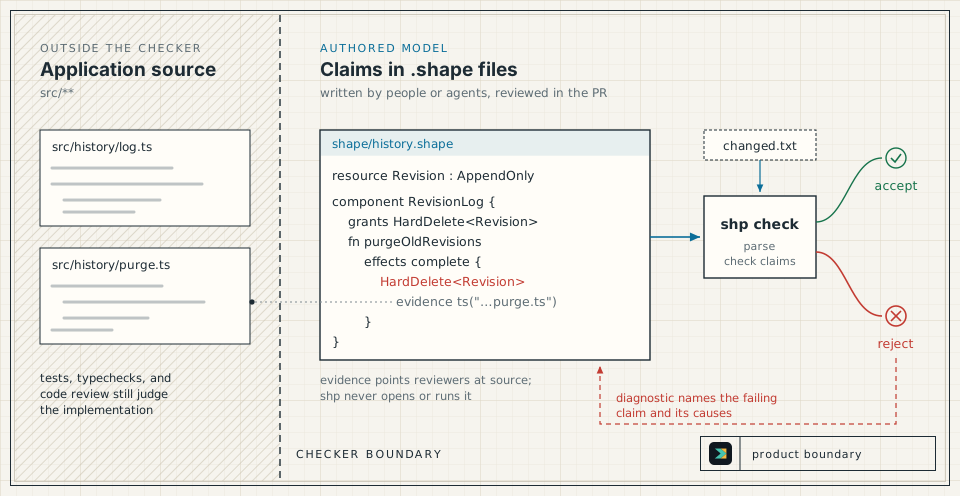
In a pull request that touches the architecture, three parties act on the same change:
- The author changes the code and the
.shapeclaims that describe it. When a source file the model governs changes but its architecture does not, the author records anattest no_shape_changewith a reason instead.shp author,shp ast, or a coding agent can draft the update; a draft is a suggestion until a person reviews it. - Reviewers read the changed claims next to the code, follow the
sourceandevidencerefs, and read any rationale, memory, or reevaluation attached to guarded targets. - CI runs
shp check --changed-files changed.txt. It checks the whole model, requires a Shape update or attestation in the same change for each changed governed source file, and enforces bindings such as a paired docs change. On failure, the diagnostic names the failing claim and its causes, and the author changes the code, the design decision, or the claim that was wrong.
Tests, typechecks, and code review keep running beside Shape.
Limits worth knowing
Section titled “Limits worth knowing”- Final forbids are final. Grants, rationale, memory, reevaluation, attestations, and imports cannot waive a
forbid final. See Effect Model. - Unknown effects must be explicit. Write
effects unknownwhile a function’s effects are not known, because an emptyeffects complete {}claims the function has none. Strictshp checkrejectseffects unknownin authored modules, so unresolved analysis fails the check. - Coverage checks that the model changed, not that it is right. A function
sourceor effectevidenceref for the changed path satisfies coverage whenever its.shapefile is part of the change, and so does ano_shape_changeattestation that is new relative to the base model, whether or not the claim is accurate. See Keep the Model Current. - Guards fire only from
changedeclarations. A guard requires areevaluationwhen achangedeclaration modifies or removes its target; editing the target’s declaration in place in the Shape model triggers nothing. See Design Memory. - Hints and drafts are advisory.
shp analyze,shp ast, andshp authorinform the author; onlyshp checkdecides whether the model passes.shp analyze --shape-filesexits 1 when it reports a warning, but it never changes the result ofshp check. See Analyzer Hints.
Reading paths
Section titled “Reading paths”| You want to | Read |
|---|---|
| Decide whether Shape fits your team | This page, then Design Rationale |
| Adopt Shape in a repository | Quickstart, Keep the Model Current, Run Shape in CI |
| Write and maintain claims | Effect Model, Relations and Graph Rules, Design Memory, Language Syntax |
| Look up a command or an error | CLI Reference, Diagnostics, Glossary |
| Contribute to Shape | CONTRIBUTING.md, then Checker Pipeline |