Quickstart
This page installs the released shp binary, builds a small Shape model for the revision history of a writing app, and walks through the most common failure: a change that claims an effect the model finally forbids. The home page describes what the checker decides and where it stops.
Install
Section titled “Install”Pin a release version in scripts and CI. The current docs pin is v0.10.0:
curl --proto '=https' --tlsv1.2 -LsSf https://github.com/timbrinded/shapelang/releases/download/v0.10.0/install.sh | shOn Windows:
irm https://github.com/timbrinded/shapelang/releases/download/v0.10.0/install.ps1 | iexThe installer downloads the release archive for your platform and verifies it against the release’s checksums.txt (SHA-256). It then installs shp, with the tree-sitter-language-pack parser directory beside it for shp ast. Archives exist for Linux x64 and ARM64, macOS ARM64, and Windows x64, and each GitHub release also attaches them with checksums.txt for manual download. The released binary needs neither Bun nor Node.
- Location. The default directory is
~/.local/bin, or$HOME\.local\binon Windows. SetSHAPE_INSTALL_DIRto install elsewhere. The POSIX installer also accepts--install-dir, passed throughsh:curl … install.sh | sh -s -- --install-dir DIR. - Version. An installer downloaded from a release installs that release. To pin another one, replace
v0.10.0in the URL, or setSHAPE_VERSIONto a release tag. - Updates.
shp updatereplaces the running binary with the latest release, or with the tag passed to--version. It is for local installs; CI should pin a version instead. See the CLI Reference.
If the install directory is not on your PATH, the installer prints the line to add. For the default directory in a POSIX shell, that line is equivalent to:
export PATH="$HOME/.local/bin:$PATH"The PowerShell installer prints the equivalent $env:PATH = "<dir>;$env:PATH" line. Confirm the install; this prints the installed version:
shp --versionWrite a first model
Section titled “Write a first model”In the writing app, each save in the editor appends a revision to the document’s history, and history is append-only so that edits can always be recovered. Create shape/history.shape in your repository:
module history
resource Revision : AppendOnly
component RevisionLog {  owns Revision  grants Append<Revision>  grants Read<Revision>  fn appendRevision    source ts("src/history/log.ts#appendRevision")    effects complete {      Append<Revision>        evidence ts("src/history/log.ts#appendRevision")    }  fn listRevisions    source ts("src/history/log.ts#listRevisions")    effects complete {      Read<Revision>        evidence ts("src/history/log.ts#listRevisions")    }}
Each declaration is a claim:
module historynames the namespace the declarations belong to.resource Revision : AppendOnlydeclares a resource, the data the claims protect, and attaches theAppendOnlytrait to it. The resource need not exist as a runtime type.AppendOnlycomes from Shape’s built-in prelude, which defines it with three final forbids on the resource:HardDelete,Truncate, andDropStorage. Do not redeclare it, because atrait AppendOnlyin the same module silently replaces the prelude trait.component RevisionLogis the part of the system that owns the resource.owns Revisionrecords that ownership for reviewers; the checker only checks that the resource exists, and ownership does not affect grants.grants Append<Revision>permits the component’s functions to emit that effect. An effect is an operation name, optionally targeted at a resource in angle brackets; names are free identifiers that the checker matches literally against grants and final forbids. A function that emits a targeted effect its component does not grant fails withmissing grant, so grant only what the component needs.fn appendRevisionsummarises a source function; it is not an implementation.effects complete { ... }claims that the listed effects are all the function has.sourceandevidenceare refs writtentag("path#symbol").sourcepoints at the function, andevidenceat the code behind one effect. The checker never opens these files. Reviewers follow the refs to check the claim, and coverage uses their paths to match changed files to the model. Prefer#symbolanchors to line numbers, which go stale.
Structural links between components, such as the editor calling the revision log, are top-level relation declarations, never members of a component. See Relations and Graph Rules.
Check the model
Section titled “Check the model”Run from the repository root:
shp checkShape check passed.With no file arguments, shp check loads every shape/**/*.shape file under the working directory as one Shape model. File arguments replace that discovery: shp check shape/history.shape checks only that file. With no shape/ directory, shp check finds nothing and passes, so a pass in a new repository means nothing until the model exists. The CLI Reference has the full discovery rules.
Check the formatting too:
shp fmt --checkShape format check passed.shp fmt without --check rewrites the files in canonical form. It rebuilds each file from its parsed structure, so it drops // and /* */ comments.
Make it fail
Section titled “Make it fail”A pull request adds a job that purges old revisions. The model must claim the new function’s effect, so the author adds purgeOldRevisions to RevisionLog, together with grants HardDelete<Revision> to allow it:
module history
resource Revision : AppendOnly
component RevisionLog {  owns Revision  grants Append<Revision>  grants HardDelete<Revision>  grants Read<Revision>  fn appendRevision    source ts("src/history/log.ts#appendRevision")    effects complete {      Append<Revision>        evidence ts("src/history/log.ts#appendRevision")    }  fn listRevisions    source ts("src/history/log.ts#listRevisions")    effects complete {      Read<Revision>        evidence ts("src/history/log.ts#listRevisions")    }  fn purgeOldRevisions    source ts("src/history/purge.ts#purgeOldRevisions")    effects complete {      HardDelete<Revision>        evidence ts("src/history/purge.ts#purgeOldRevisions")    }}
shp check now prints this diagnostic to stderr and exits 1:
error: forbidden effect
RevisionLog.purgeOldRevisions emits HardDelete<Revision>.Revision has trait AppendOnly.AppendOnly forbids final HardDelete<Revision>.evidence: ts("src/history/purge.ts#purgeOldRevisions")
caused by:  - shape/history.shape: effect RevisionLog.purgeOldRevisions emits HardDelete<Revision>  - shape/history.shape: resource Revision : AppendOnly  - standard prelude: trait AppendOnly forbids final HardDelete<T>
The first line names the check that failed. The three sentences trace the chain from the function’s claim, through the resource’s trait, to the final forbid, and evidence: repeats the effect’s ref. caused by: lists the declaration behind each step and where it came from. Diagnostics explains every diagnostic.
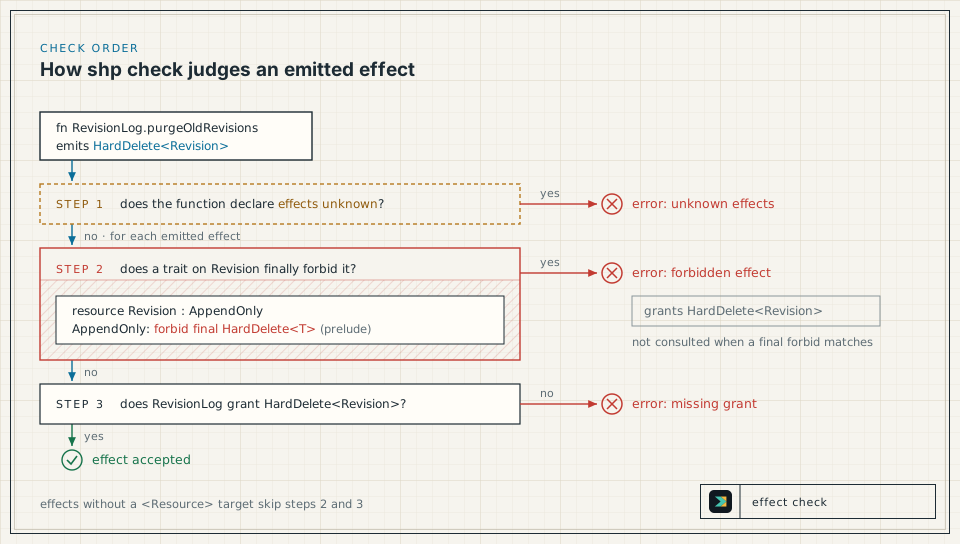
The checker judges each function in this order:
- A function that declares
effects unknownfails withunknown effects; see Draft with unknown effects. - For each effect with a resource target: does a trait on that resource finally forbid it? If so, the result is
forbidden effect, and the grant question is skipped. - Otherwise, does the component grant the effect? If not, the result is
missing grant.
Effects without a resource target skip steps 2 and 3. HardDelete<Revision> has a target and stops at step 2, so its grant is never consulted: delete the grant and the output is identical. The Effect Model gives the complete check order.
Resolve it
Section titled “Resolve it”Nothing in the model waives a final forbid: not a grant, rationale, memory, reevaluation, or attestation. To land the purge, change one of the facts the diagnostic names:
- Remove the destructive code. Take the hard delete out of the source, then remove its
HardDelete<Revision>claim and grant from the model. - Change the decision. If revisions may be deleted after all, remove
AppendOnlyfromRevision, and have reviewers approve that as a design change. - Move the behaviour. Have the purge act on a resource whose traits do not finally forbid
HardDelete, and claim the effect against that resource.
Never make the check pass by deleting the HardDelete<Revision> entry while the code still performs the delete. The summary claims to be complete, so a missing real effect makes the model false, and the checker cannot tell.
To continue with a passing model, remove purgeOldRevisions and its grant.
Draft with unknown effects
Section titled “Draft with unknown effects”When a function exists but its effects are not yet known, say so with effects unknown inside RevisionLog:
fn exportRevisions source ts("src/history/export.ts#exportRevisions") effects unknownPrefer this to an empty effects complete {}, which claims the function has no effects. Strict shp check rejects unknown effects in authored modules, so an unresolved summary fails the check. (A function is exempt only when its module is named shape.generated.ast or starts with shape.generated.ast., and its file is under shape/generated/ast/, which is where shp ast writes its drafts; see Generate Drafts from Source.) Strict shp check exits 1 with:
error: unknown effects
RevisionLog.exportRevisions declares effects unknown.
caused by:  - shape/history.shape: fn RevisionLog.exportRevisions
While drafting locally, --allow-unknown-effects downgrades only this diagnostic to a warning. The run prints to stdout and exits 0:
shp check --allow-unknown-effectswarning: unknown effects
RevisionLog.exportRevisions declares effects unknown.
caused by: - shape/history.shape: fn RevisionLog.exportRevisions
Shape check passed with warnings.Every other diagnostic still fails the run. Resolve the unknowns and run strict shp check before review, and never pass the flag in CI. The CLI Reference has the flag’s full contract.
Use Shape with Claude Code
Section titled “Use Shape with Claude Code”The Shape skills ship as a Claude Code plugin. They call the shp CLI, so keep the binary on your PATH:
/plugin marketplace add timbrinded/shapelang/plugin install shapelang@shapelang/reload-plugins| Skill | Use it to |
|---|---|
shapelang:shape-lang | Write, repair, explain, format, and validate .shape files |
shapelang:shape-contract-preflight | Map a planned code change onto the Shape model and its obligations before editing |
shapelang:shape-contract-guard | Compare a base and a candidate .shape contract for changes that loosen it |
shapelang:shape-index | Create or refresh a whole-repository Shape model, when asked to explicitly |
shapelang:shape-review | Review a code diff for reachable bugs, using the Shape model |
shapelang:unix-system-visualiser | Generate a browsable visual atlas of an authored Shape model |
A skill’s output is advice for the author. Only shp check decides whether the model passes.
Add Shape to CI
Section titled “Add Shape to CI”In CI, install the same pin with the setup action and run both checks:
steps: - uses: actions/checkout@v4 - uses: timbrinded/shapelang@v0.10.0 - run: shp fmt --check - run: shp checkKeep the Model Current explains how source changes and model updates travel together. Run Shape in CI then extends this job with a changed-file list, so that shp check --changed-files changed.txt also enforces coverage and bindings.